
Quick picks
What is a VPN, in plain words?
VPN stands for virtual private network. The name doesn't explain much, so here's a picture that does. Think about mailing a letter.
Every time you open a website, your phone or computer sends out a small message asking for the page, and the website sends the page back. Each of those messages works a lot like a letter. There's what's inside, and there's the outside of the envelope, which says where the letter is going and where it came from.
Your return address is called an IP address
The "where it came from" part has a name. It's called your IP address. Basically, it's the return address of your internet connection, whether that's your home internet or your phone's data. Every website you visit sees it, because the website needs to know where to send the page back.
And the "where it's going" part has to be readable by everyone who carries your message, the same way a mail carrier has to read the address on an envelope. The main one carrying your messages is your internet provider, which is just the company you pay each month for internet at home or for data on your phone. If you're on someone else's Wi-Fi, like a coffee shop's or your work's, whoever runs that Wi-Fi is carrying your messages too.
What a VPN does to your letters
Now here's where the VPN comes in. Basically, a VPN app puts every message inside a locked box before it leaves your phone or computer. The box is addressed to one place only, which is a computer the VPN company runs somewhere else in the world. That computer is called a VPN server.
Anyone carrying the box can see that it's going to the VPN company. But they can't open it, so they can't see the letter inside or which website it's really for.
When the box reaches the VPN server, the VPN company unlocks it, takes out your letter, and sends it on to the website. And it puts its own return address on the letter instead of yours. So the website only ever sees the VPN server's address. When the website answers, the answer goes back to the VPN server, which locks it in a box again and sends it to you.
What "encryption" and "tunnel" mean
The locking has a name too. It's called encryption. Basically, encryption scrambles your messages with a secret code so they look like random gibberish to anyone who doesn't have the key. Your VPN app and the VPN server are the only two that hold the key.
And you'll see VPN companies talk about an "encrypted tunnel" all the time. It's not a real tunnel, of course. It's just their way of describing the route between your phone or computer and the VPN server, where every message travels inside that locked box. Nobody along the way can see in, a little like a car driving through a tunnel where nobody outside can see it. When you see "encrypted tunnel", that's all it means.
Seeing the return address change
I saw the return address swap happen myself while testing Ultimate VPN on a Mac and an iPhone in October 2026. Something to note here is that I work with the team that builds Ultimate VPN and have a financial stake in it. So I hold it to the same facts as every other product on this site.
Each time I connected, the IP address that websites saw was different from the one before. And it belonged to a cloud computing company rather than to my home internet. That's exactly what a VPN is supposed to do. The website sees the VPN's return address, not yours.
Who can see what, with and without a VPN?
Before the table, there's one more piece of the picture. Most websites today already seal the letter itself. That's what the little padlock next to a web address means, and it's what the "s" in "https" at the start of an address stands for: secure.
Basically, HTTPS seals what's inside the letter between you and the website, so nobody carrying it can read the page you're looking at. But the outside of the envelope, meaning which website it's going to, can still be read by the people carrying it.
So the real question a VPN answers isn't whether someone can read your messages. It's who can see which websites you visit, and when. Here's the answer for each of the four people involved.
| Who | Without a VPN | With a VPN |
|---|---|---|
| Your internet provider (the company you pay for internet) | Which websites you visit, when, and roughly how much you download. Not what's on the page, as long as the website uses HTTPS. | That you're using a VPN, which VPN company's computer you're connected to, when, and how much. Not which websites you visit. |
| Whoever runs the Wi-Fi (a coffee shop, hotel, school or employer) | The same as your internet provider. And if it's a work or school laptop, any software they put on it can see everything on the laptop. | The same as your internet provider. Software they put on your laptop can still see everything, because that software is inside the laptop, before anything gets locked. |
| The website you visit | Your IP address, who you are if you signed in, and what its cookies remember about you. | The VPN's IP address instead of yours. But it still knows who you are if you signed in, and its cookies still remember you. |
| The VPN company | Nothing, because you're not using one. | Which websites you visit, when, how much, and your real IP address. Not what's on the page, as long as the website uses HTTPS. |
So the honest way to put it is that a VPN moves who can see which websites you visit. Your internet provider loses that view, and the VPN company gets it. The Electronic Frontier Foundation, a nonprofit that writes privacy guides, puts it the same way. It points out that the VPN company could keep or share that information, just like an internet provider could. That's why what a VPN company keeps gets its own page, what "no logs" means and what an audit proves.
And this is also why your internet provider can usually tell you're using a VPN at all. All it sees is a steady stream of locked boxes going to one VPN company. Ultimate VPN's own FAQ says this plainly. The company running the network can often tell a VPN is in use from where the boxes go, how often, and how many. And Ultimate VPN doesn't promise to hide that. I appreciate that, because some VPNs advertise being "undetectable", and the honest answer is that people can usually see the boxes even when they can't see inside them.
Why can my internet provider see which website I visit if the page is sealed?
This trips a lot of people up, so here's the plain version. Even with HTTPS, the very first message to a website has to say which website it's for, before the sealing starts, so the right website can answer. Think of it as the address written on the outside of the envelope. So your internet provider can't read the page, but it can read which website you asked for.
A fix for this exists. In March 2026, the group that writes the internet's technical rules published a new standard called Encrypted Client Hello, which hides that outside address too. But both your web browser and the website have to use it, and I can't tell you how many websites do yet. So for now, assume the website name is visible to whoever carries your connection, unless you're using a VPN.
Does a VPN hide my search history, and from whom?
It depends on who you're trying to hide it from. A VPN hides which websites you visit from your internet provider, from whoever runs the Wi-Fi, and from a school or work network. It does not hide anything from the website itself, from Google if you're signed in to Google, or from the VPN company.
And this is where people mix up a VPN with incognito mode, which is the private window in your web browser. Basically, incognito only stops your own browser from saving your history and what you typed on that phone or computer. That's all it does. Google's own help page for Chrome says incognito doesn't make you invisible. The websites you visit, your school, your employer and your internet provider can still see what you do.
So incognito hides things from the next person who picks up your laptop. A VPN hides which websites you visit from the companies carrying your messages. They do different jobs, and you can use both at once.
Does a VPN protect me from hackers?
This is the question I hear most, and the honest answer is that a VPN protects you from one kind of attacker and not from most of the others. The one it helps with is someone snooping on the Wi-Fi you're using, like a stranger on the same hotel network. All they see is locked boxes going to the VPN company.
But most of what actually costs people money doesn't come from someone snooping on the Wi-Fi. Here's what a VPN does nothing about.
- Scam emails and texts. These are called phishing. Basically, it's a message that pretends to be from your bank or a company you use, and tries to get you to click a link or type in your password. The Federal Trade Commission's advice for stopping it is keeping your software updated, turning on sign-in codes, keeping backups and using spam filters. A VPN isn't on that list, because the locked box delivers a scam email to you just as faithfully as a real one.
- Viruses and other harmful software. The general name for these is malware. Whatever you download comes to you inside the locked box, harmful or not. Some VPN apps include a separate virus blocker as an extra, but that's a different tool riding along, not the VPN itself.
- A stolen password or a hacked account. If someone has your password, they just sign in from their own computer, and your VPN never enters the picture. A strong password you don't reuse, plus a sign-in code sent to your phone, does that job. That code is often called two-factor or multi-factor sign-in.
- Being recognized when you're signed in. If you sign in to a website, it knows who you are no matter whose return address is on the letter. The same goes for cookies, which are small notes a website saves in your browser so it remembers you next time.
- Browser fingerprinting. Basically, a website can tell your browser apart from other people's by its settings, like your screen size and the fonts you have, without ever looking at your IP address. The Electronic Frontier Foundation has a free test called Cover Your Tracks that shows how easy your browser is to pick out.
And there's one more thing worth knowing. In 2024, researchers at a security company called Leviathan found a flaw they named TunnelVision. Its official tracking number is CVE-2024-3661, which is the ID security experts use to keep track of a known flaw. Basically, someone on the same Wi-Fi as you can use an ordinary network setting to steer some of your messages around the locked box. Those messages go out unlocked, while your VPN app still says "connected".
The researchers said they'd seen no sign of anyone using it against real people. They also said it can't be fully fixed on most phones and computers. I bring it up not to scare you, but because it shows a VPN is a tool with limits, not a force field.
Is a VPN safe on public Wi-Fi, and do I need one at a coffee shop?
The advice on this has changed over the years, and what you'll find online disagrees with itself, so let me lay it out.
The old advice was "always use a VPN on public Wi-Fi", and the reason was that years ago a lot of websites didn't use HTTPS. The letters weren't sealed, so a stranger on the same Wi-Fi could sometimes read your pages and even your passwords. That's mostly gone now. Cloudflare is a company that carries a large share of the world's web traffic. It reported that from July through September 2026, about 99 out of every 100 requests for web pages from people on its network used HTTPS. So on nearly every website, the stranger on the coffee shop Wi-Fi sees sealed letters, with or without a VPN.
What they can still see is the outside of the envelope, meaning which websites you visit, for the reason I explained above. A VPN covers that. And the Electronic Frontier Foundation's current view is that a VPN is less necessary than it used to be for most people. But it can still make sense on a Wi-Fi network you don't trust, as long as you trust the VPN company more than you trust that network.
Now the government advice is older and firmer. The Federal Trade Commission published tips in 2018 for choosing a VPN app to protect information on public Wi-Fi. And in 2021 the NSA told its own employees working from outside the office to avoid public Wi-Fi where possible. It said to use a personal hotspot instead, meaning your own phone's data connection shared with your laptop. If they couldn't avoid public Wi-Fi, they should use a VPN and stay off banking and other sensitive accounts.
Both of those came before HTTPS was as common as it is now. But the NSA's two plain tips still hold. Your own phone's hotspot beats a stranger's Wi-Fi, and if a sign-in really matters, wait until you're home.
And then there's the fake Wi-Fi network, sometimes called an evil twin. Basically, someone sets up a Wi-Fi network with the same name as the coffee shop's, and your phone joins theirs instead. A VPN does help here, because once it's connected, everything goes out in the locked box. But if they show you a fake sign-in page before you connect, it's still a fake sign-in page, and no VPN will warn you about it.
So ultimately, on public Wi-Fi a VPN hides which websites you visit from whoever runs or snoops on that network. It doesn't fix a weak password, a scam link or a fake sign-in page, and those are where most people actually get hurt.
What is a DNS leak?
Before your phone or computer can reach a website, it has to look up the website's IP address, the way you'd look up a business's phone number before calling it. That lookup is called DNS, and it usually goes to a lookup service run by your internet provider.
A DNS leak is when those lookups slip out of the locked box and go to your internet provider's lookup service anyway. Everything else is locked, but your internet provider still gets a list of every website you looked up, which defeats most of the point.
Leaks usually come from a VPN that's set up wrong, or from a poorly made app that falls back on your internet provider's lookup service when its own is slow. A well-made VPN app sends the lookups inside the locked box too, and most paid VPN apps have a setting for this, often called DNS leak protection. Ultimate VPN's app showed that setting switched on when I tested it. Keep in mind that's the app's own switch, not an outside test of whether it works.
What does a kill switch do?
A kill switch is a setting in a VPN app that cuts off your internet completely if the VPN connection drops. That way nothing goes out unlocked while the app reconnects. Without one, your phone or computer quietly goes back to sending normal, unlocked messages the moment the VPN fails, and you might not notice for a while.
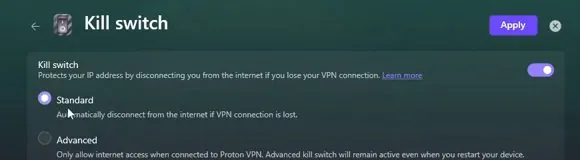
The kill switch screen in Proton VPN's Windows app, with the Standard and Advanced choices, from Shortcut Academy's video.
Proton VPN's help page is a good example of how the choices usually look. Its Standard kill switch only steps in when the connection drops unexpectedly. Its Advanced one blocks all internet unless the VPN is connected, even after you restart your computer.
The same page also lists the limits, which I appreciate. On a Mac, your real IP address can show for a moment while you switch to a different VPN server. And some of Apple's own background lookups can go around the VPN on a Mac or iPhone. Ultimate VPN's FAQ says something similar, that its kill switch works differently on each kind of computer and isn't a guarantee.
So a kill switch is worth turning on, and it's still not a promise. I go deeper on what happens the moment a connection drops in what happens to your data when you disconnect.
What does "no logs" mean?
Since the VPN company can see which websites you visit, the next question is what it writes down. A log is just a record a company keeps, like a diary of who connected and what they did. "No logs" is the phrase nearly every VPN uses to say it doesn't keep records of what you do online.
Something to note is that there's no standard meaning for "no logs". So each company's privacy policy is the only place to find out what it actually keeps.
Mullvad's policy, for example, says it keeps no record of the websites you visit, your lookups, when you connected or your IP address. It does keep your account number, when your account expires, and how much you paid.
Ultimate VPN's policy says it doesn't record the websites you visit, your lookups or what's inside your messages. It does keep records of your account, your devices and your connections. Some of its technical records can contain IP addresses. And it says outright that no outside company has checked its no-logs promise. That's the kind of plain list I want to see from any VPN, including one I'm connected to.
And keep in mind that "no logs" is a promise, not a proof. In 2017, an FBI court filing described a VPN company called PureVPN handing over records that showed the same customer connecting from two places. That was while PureVPN advertised that it kept no logs of your activity.
The way to check a promise like that is an audit, which is when an outside firm inspects the company's systems and reports what it found. Even an audit only shows what was true while the auditors were looking. All of that is on what "no logs" means and what an audit proves.
Will a VPN slow down my internet?
Usually a little, because every message takes a detour through the VPN company's computer and gets locked and unlocked along the way. How much it slows you down depends on how far away that computer is and how busy it is.
Here's one example from my own home internet, run once each on October 15, 2026, so treat it as a snapshot rather than a ranking. Download and upload speed are measured in megabits per second, written Mbps, and higher is faster. Ping is how long a message takes to get there and back, in milliseconds, written ms, and lower is better.
| Connection | Download | Upload | Ping |
|---|---|---|---|
| No VPN | 383 Mbps | 20.7 Mbps | 28 ms |
| NordVPN, Seattle server | 270 Mbps | 19.7 Mbps | 28 ms |
| Ultimate VPN, US West | 265 Mbps | 19.7 Mbps | 42 ms |
So both VPNs cost me about 30 percent of my download speed and almost nothing on upload. Ultimate VPN also added about 14 milliseconds of delay that NordVPN didn't. For browsing and watching video you'd never notice any of that. For online gaming, ping is the number to watch.
Three videos that explain this well
These three cover the same ground with pictures. None of them is trying to sell you a particular VPN, with one exception I note below.
The clearest whiteboard explanation I've found, from a company that isn't selling a VPN.
- The pipe: He draws the VPN connection as a pipe from your computer to the VPN company. Then he shows who sees what with no VPN, a work VPN, a paid VPN and a VPN you run yourself.
- The key line: A VPN transfers trust, it doesn't remove it. The VPN company sees your traffic at its end.
- What it can't do: It can't make you fully anonymous, stop cookies or fingerprinting, or stop viruses, and it adds some delay.
- Free VPNs: He warns that a free VPN may be paid for with your data.
Six common beliefs about VPNs, tested one by one. Keep in mind that NordVPN sponsored this video, and he says so in the first minute.
- The demonstration: He records his own internet traffic and shows that website names are visible even on sealed HTTPS pages. Then he turns on a VPN and shows that nothing is readable.
- Hackers: His point is that the danger was never inside the VPN connection. Scam emails, fake shopping websites and harmful downloads go right through.
- Tracking: He covers the PureVPN case, cookies and fingerprinting, and runs the Cover Your Tracks test on camera.
Older, but still one of the most watched plain explanations, with over four million views. The share of websites using HTTPS that he gives is from 2021 and is well below today's.
- What's true without a VPN: Your internet provider sees the websites you visit, and most websites are already sealed with HTTPS. Websites track you with cookies, they see your IP address, and in the end it all comes down to who you trust.
- What a VPN isn't: It isn't your internet connection, it doesn't make you invisible, and it isn't antivirus.
- His main point: The biggest risk to most people is a scam, not the Wi-Fi.
The VPNs mentioned on this page
I named a few VPNs above as examples of how things work, not as recommendations. Here's where to find each one and what it costs to start. Keep in mind prices change, so check the linked page before buying.
| VPN | Starting price | Owner |
|---|---|---|
| Proton VPN | $3.49 a month on a two-year plan, paid up front, plus a free plan | Proton AG, Switzerland |
| Mullvad | 5 euros a month, the same price whether you buy one month or a year | Amagicom AB, Sweden |
| NordVPN | NordVPN's pricing page shows only its current deal, which changes often | Nord Security |
| Ultimate VPN | $59 a month, billed monthly, for 3 devices connected at once | Triple Knot Technologies LLC, Portland, Oregon |
Whether any VPN is worth paying for is its own question, and I answer it situation by situation in do you need a VPN, and is one worth paying for.
So ultimately
So ultimately, a VPN does one thing well. It hides which websites you visit from your internet provider and from whoever runs the Wi-Fi you're on, and it shows websites the VPN's return address instead of yours.
In return, the VPN company sees which websites you visit, so pick one whose privacy policy says plainly what it keeps. And a VPN does nothing about scam emails, viruses, a stolen password or a website that knows you because you're signed in. Those are handled by keeping your software updated, turning on sign-in codes, and being careful what you click.
If you want to know whether you need a VPN at all, that's the next page.
Have a question about “What does a VPN actually do, and what doesn't it protect you from?”?
Ask it here. Every question comes to me first. I answer as many as I can, and each answered question goes on this page with my answer so other readers can see it too. I don't ask for your email, so check back on this page for the answer.
More basics guides
- Electronic Frontier Foundation, Surveillance Self-Defense, Choosing the VPN That's Right for You, last reviewed July 28, 2026: ssd.eff.org.
- Electronic Frontier Foundation, Cover Your Tracks, about browser fingerprinting: coveryourtracks.eff.org.
- Google Chrome Help, Browse in private, on what Incognito does and doesn't hide: support.google.com.
- Internet Engineering Task Force, RFC 9849, TLS Encrypted Client Hello, March 2026: datatracker.ietf.org.
- Federal Trade Commission, How To Recognize and Avoid Phishing Scams: consumer.ftc.gov.
- Federal Trade Commission, tips for using VPN apps on public Wi-Fi, February 22, 2018: ftc.gov.
- NSA guidance Securing Wireless Devices in Public Settings, July 2021, as reported by Nextgov.
- Leviathan Security Group, TunnelVision research, 2024: leviathansecurity.com, and the NIST entry for CVE-2024-3661, published May 6, 2024.
- Cloudflare Radar HTTPS figures for July to September 2026, as summarized by TechnologyChecker, October 2026.
- Mozilla VPN, What is a DNS leak: mozilla.org.
- Proton VPN support, What is kill switch: protonvpn.com.
- Mullvad, no-logging data policy, last updated June 17, 2026: mullvad.net.
- Ultimate VPN FAQ, privacy policy and pricing: ultimatevpn.ai/faq, ultimatevpn.ai/legal, ultimatevpn.ai/pricing.
- TorrentFreak on the PureVPN FBI case, October 9, 2017, updated November 28, 2019: torrentfreak.com.
- My own speed test on October 15, 2026, on a Mac over home internet, one run each, using speedtest.net.
No company paid to be on this page, and there are no affiliate links. It gives general information about security products, not legal advice.